
Recover deleted files form recycle bin in windows with restore trick
Computer File is the data stored in the computer. For some people, the file is very important because it is the result of their work. People who use computers, will save the results of their work on the files on the computer.Sometimes, we have removed a file, and we want the file back. To restore the file, it is very easy, you just need to open the "Recycle Bin" on the desktop and right click the deleted file and select "Restore". So what if we have emptied the recycle bin (trash in advance) and have deleted the file and we want the file back? You can still restore these files easily, provided you do not delete the file to overwrite a file eraser software file several times. Suppose you have deleted files Wildlive.wmv the Sample Videos folder and also in the recycle bin, files have been deleted. Then, you want to restore the file. It is very easy, you just need to follow the steps file returns.

Sample Videos folder view before deleted files

View Sample Videos folder after file deleted
Restoring Deleted Files Restore Previous Versions With Facility
This facility is a facility that has been provided by Windows to restore the folder and its contents back to the settings and data in the previous folder. You can select the data back to the previous folder. This facility is done automatically by Windows to restore data to the previous folder. The following are the steps to recover / restore / recover / deleted file recovery restore previous version folder facility:
- Open the folder where the file is deleted with the "Windows Explorer".

Folder Sample Videos
- Right click on the folder and select "Restore previous versions".

Right click on the folder view
- Select the folder that contains the files that have not been deleted and then click "Restore" -> "Restore" -> "OK" -> "OK".

Properties window Sample Videos folder
- The result is you get a folder and its contents before deleted files and folders as well as files deleted are still there, so you'll see the same folder 2.

2 Sample Videos folder
- Deleted files will be back to normal.
Wildlive.wmv file is back
If you like the post,please share this
how to download from Torrent and its procedure

Torrent is a file extension of the application of the BitTorrent protocol that goes with methods Peer-to-Peer or better known as "p2p" , as well as downloading the torrent download via http port, perbedanya there on how to download the packet, if using http a single port on a single TCP socket and a specific port (port 80), BitTorrent uses TCP and UDP sockets at once using a different random port simultaneously.
Simply put it this way: If we usually download a file from Download.com then we will download the file from the server Download.com, indirectly they have to provide the file to be downloaded by many people, can we imagine that at one time there were 100 thousand people who download the file at the same time, how much bandwidth is being used? This method download via HTTP protocol.
Previously I described in the first 3 critical factors that torrent tracker, seeder and leecher. These three factors are interrelated later. what the tracker, seeders and leechers? Tracker : serves as a provider of information when downloading data exchange, more clearly see here Leechers : the downloader file, if you download a file from torrent then we could be called leechers. Seeders : as a file provider, or also can leechers who have finished downloading it and keep the torrent so switching function of leechers to seeders if we are going to download the torrent then before we will download the file. torrent file providers from various sites. torrent, the available information in the file that the file will be downloaded and its address tracker, tracker here now will be in charge of distributing data and information among peers (seeders and leechers) on the internet, the tracker will inform us (here we as leechers) on the data and information that we need to download the "bits" or part of the file , and we were directed to the IP address of seeders so that we can start downloading the bits. Upon download running then we can also turn into seeders Functions as some people (probably) will take some bits from our place is what affects the number of seeders and leechers of a torrent. So it is not like HTTP download method which is based on a single point, for more details see the illustrations that I took from wikipedia. illustration of data transfer BitTorrent: Score (+): The more the number of seeder, the faster the download is complete, according to the maximum speed our internet connection. process of downloading can stop or resume at any time. easy download management. value (-): The fewer the number of seeders the download speed is also customizable with the ability to upload seeders. share files in a virus-free does not guarantee or in accordance with that we want. way download torrent If you want to download something via torrent you can use a BitTorrent client like uTorrent , Azureus or the other. Simply download the file
. torrent in want from sites like torrent search providers, ThePirateBay , or use the torrent search index like Torrentz and many others. Once downloaded, the file . torrent that we put on earlier application BitTorrent Client (the input file. torrent can be found on the manual page for each application) then the downloading process will be carried out by the BitTorrent Client, you can see statistically large data files, the number of peers, number of seeders and others. Open uTorrent select add torrent files as in the picture: Put torrent files that have been previously downloaded from torrent provider site.Specify the storage location for the downloaded file Wait for the download to 100% Slow when downloading torrent? If anyone says that the download via BitTorrent is slow, then it's a big one, from an ISP statistics show bawhwa BitTorrent uses about 18% of the total traffic of broadband internet connection around the world in 2004, an amount sufficient not high: D. Possible happens if at the time of slow downloads via BitTorrent is the least number of connected peers, or a large number of peers but has a slight amount of seeder, or it could be because you are behind a firewall (assuming you have a firewall that blocks traffic Data p2p). This usually happens when we use the internet connection in the office or cafe. Solution to do is carefully before downloading a torrent, especially read the comments on the torrent provider site as a reference before downloading the torrent file. 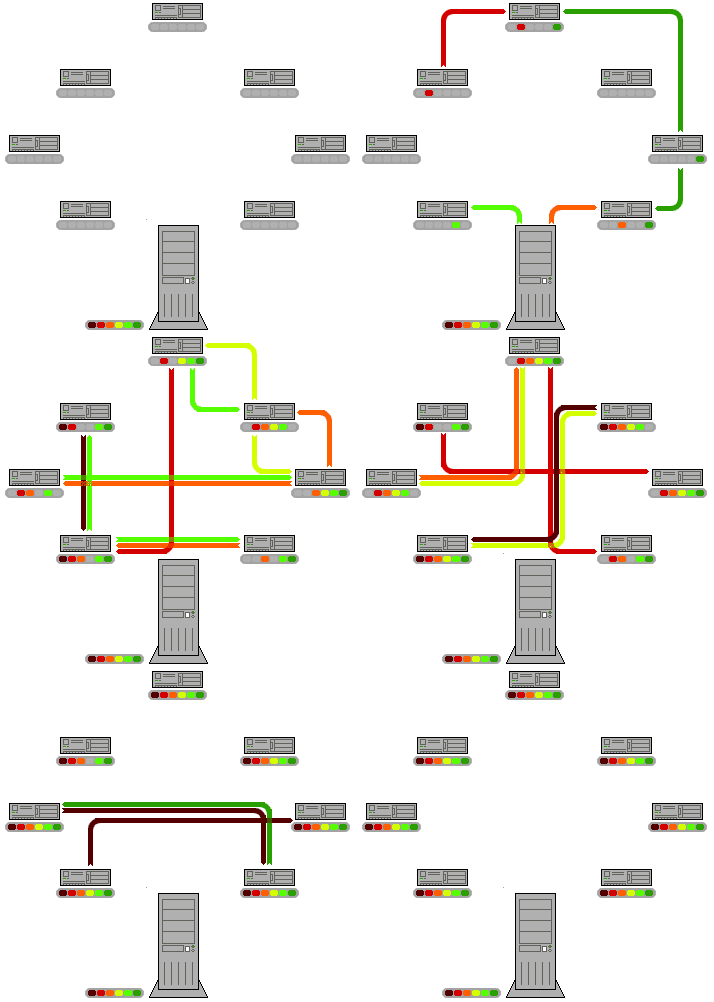


If you like the post,please share this
Crack Your Windows 8 Trial Apps For Free

Trial applications downloaded from the Windows 8 Store can be easily converted to full paid versions by applying a so called ’sideload crack’. The tool has been around best tool for activating windows 8 paid apps and has appeared on a Russian website dealing with Windows 8 piracy. Besides making applications free, the tool also makes it possible to install Metro applications without using the Windows 8 Store. It’s only possible to ‘crack’ software that has a trial version. In order to convert an application, the trial version needs to be downloaded from the Windows Store.It is a nice Tool that converts Windows 8 Store trial apps to full paid version – for free for ever...
How to Crack Your Windows 8 Trial Apps
How to Proceed:
- Install wscrack_32 or wscrack_64 depending on your Windows OS version – x86 or x64.
- Install trial app store.
- Enter wscrack_anycpu \ TokensExtractor.exe
- Now click on “Brute Force tokens.dat”
- Locate your product and click “CrackIt!” (bottom of the list is mostly “…………. (Trial)”)
- App is now full license.
Run application and see if it is unlocked or not and enjoy..
Please Note : Not all apps have a trial version but most do! Disable your antivirus first….

If you like the post,please share this
activate Windows 8's File History feature
If you like the post,please share this

